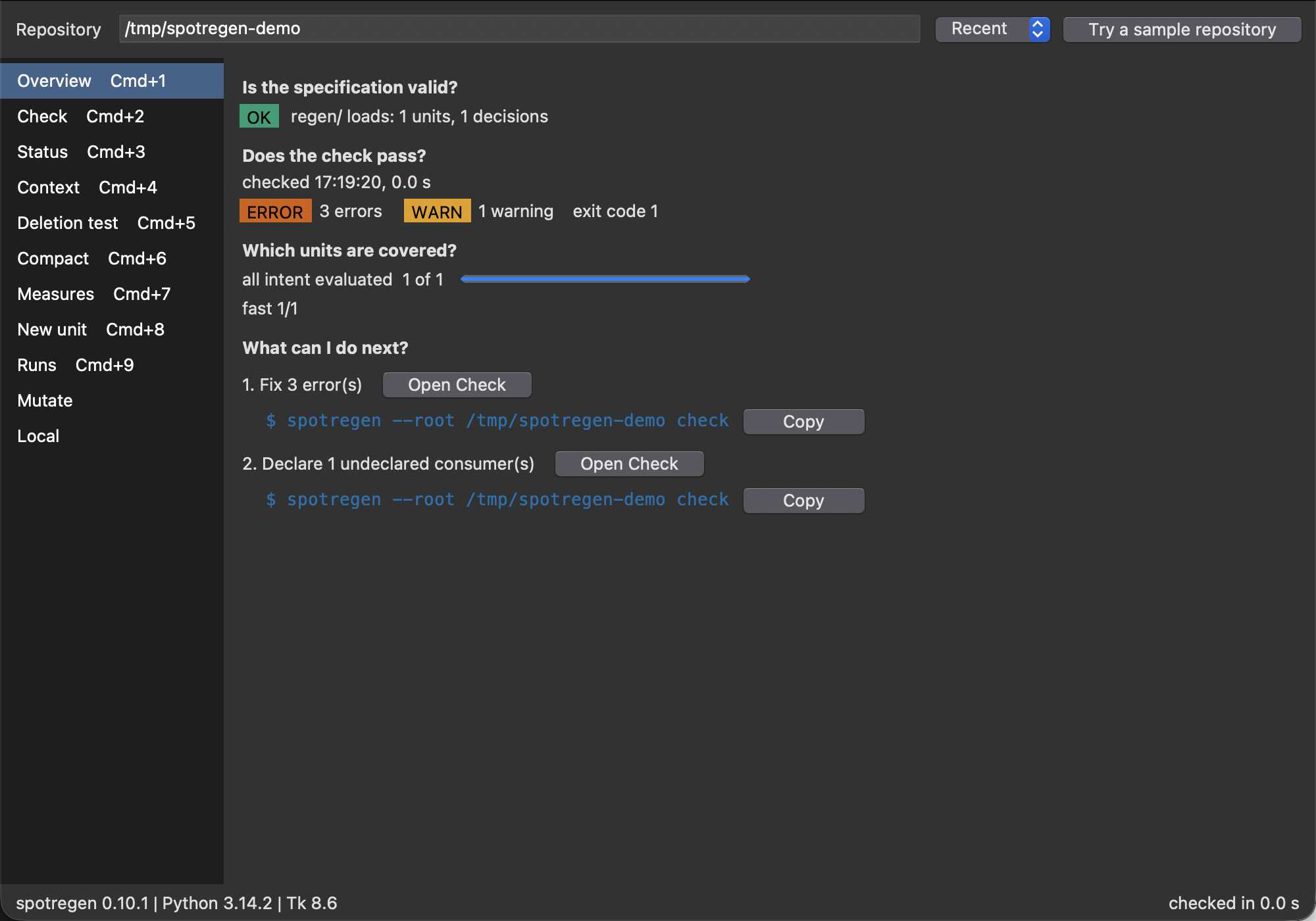
spotregen gui opens a window for the questions a researcher asks first: Is the specification valid? Does the check pass? Which units are covered? What do I do next? It uses tkinter from the Python standard library, so it adds no dependency, and it computes nothing the command line computes. Under every action it shows the exact command, with a Copy button, so the window teaches the command line instead of hiding it. The design is recorded in ADR 0002.
The window opens the repository from --root, else the one above the current directory, else the most recent one. It runs check in the background at once, so a first-time user sees a result without clicking anything. With no repository at all, press Try a sample repository.
If the message says that this Python has no tkinter, use a Python that ships Tk. Builds managed by uv do (uv python install 3.13). Homebrew’s Python needs brew install python-tk@3.13, Debian and Ubuntu need sudo apt install python3-tk.
Note
macOS is the reference platform. Linux and Windows work on a best-effort basis and are not tested. Screen readers are not supported (Tk 8.6 offers none).
The window
The repository bar holds a path field with Tab completion, the Recent list and Try a sample repository. The interface opens no file or folder chooser: paths are typed or picked from the list. A specification that does not load is an expected state, so it appears as a banner on the Overview, with Open file at the failing line when the parser reports one.
The sidebar switches between the views. The status bar shows the versions of spotregen, Python and Tk. When the uv.lock of the repository pins another spotregen version than the one that runs, an orange warning appears; the window keeps working.
Overview
The Overview answers the four questions in order: the spec loads, the check passes (errors, warnings and the exit code), how many units have every intent item evaluated (by pace), and a short list of next steps, each with the view that helps and its command.
Check
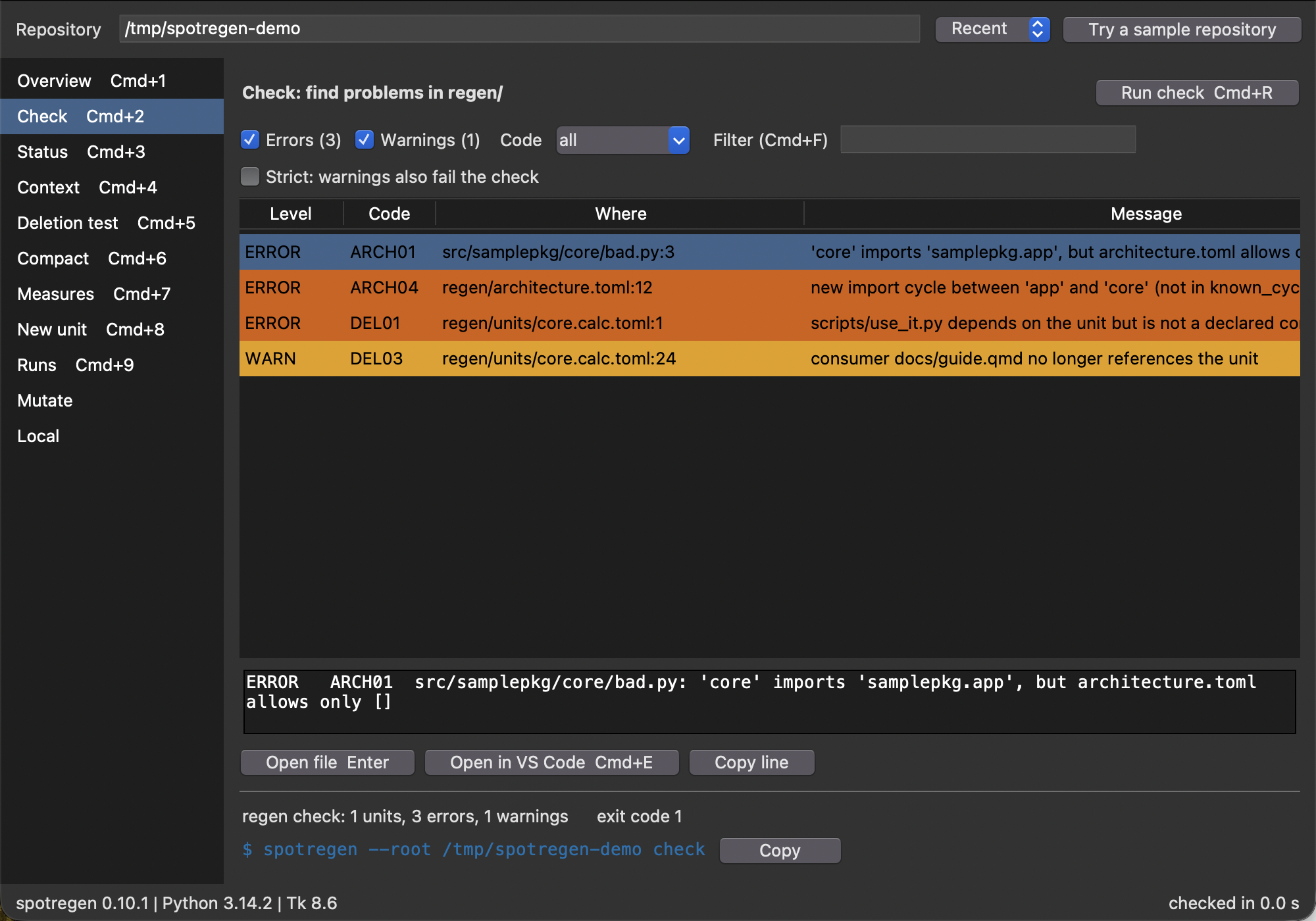
The Check view lists the findings of spotregen check, errors first. The Where column reads path:line, so the finding can be opened at the right line. Filter by level, by code or by text. The line below the table is Finding.format(), byte for byte what the command line prints, and the summary line and the exit code come from checks.summary_line and checks.exit_code. Strict adds warnings to the exit code and the command changes to check --strict.
Open file shows the file in a read-only viewer with the line highlighted. Open in VS Code starts VS Code at the line (code --goto). VS Code is found on the PATH or in its application bundle. Without it, Vim is the fallback and the button says so: MacVim if mvim is on the PATH, otherwise a new Terminal window on macOS or xterm elsewhere. The command is an argument list and never goes through a shell. It can be changed in settings.json.
Status
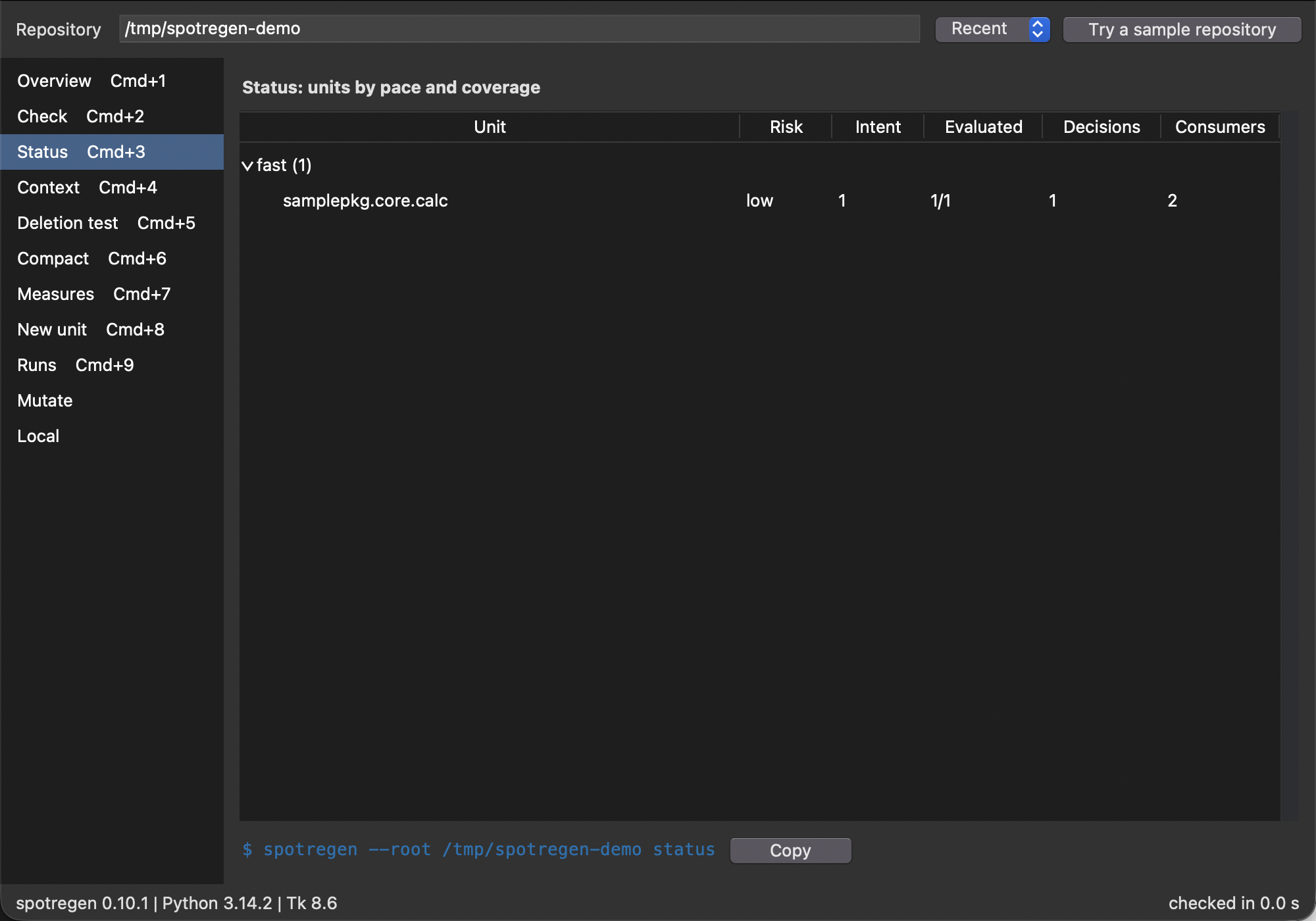
The Status view is spotregen status as a sortable table: units grouped by pace, with risk, intent items, evaluated items, decisions and consumers. Units with an intent item that no evaluation covers are marked.
Context
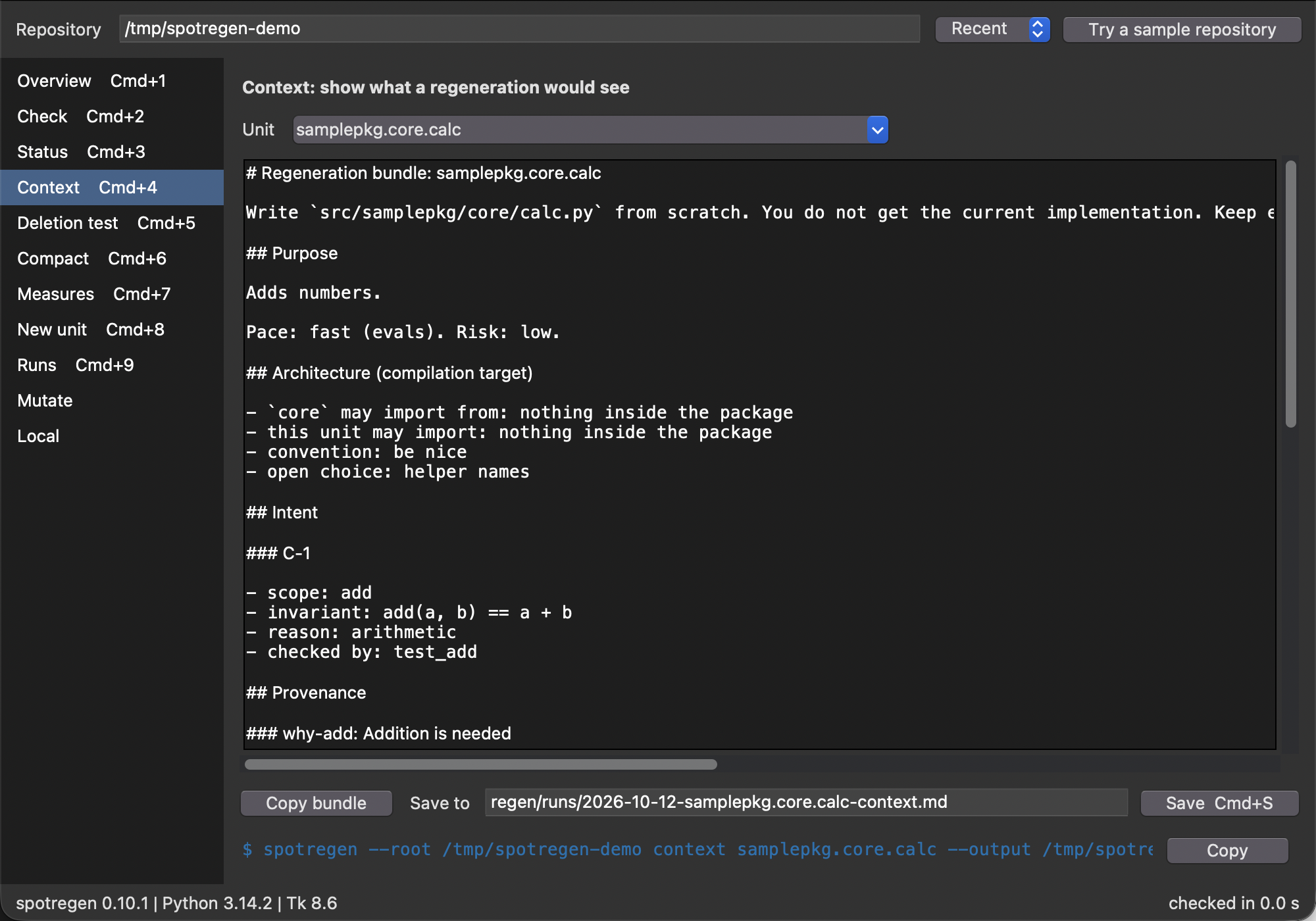
Pick a unit and the Context view shows the regeneration bundle: what a model would get to write the unit again, without the implementation. Copy bundle puts it on the clipboard. Save (Cmd+S) writes it to the path field, which defaults to regen/runs/<date>-<unit>-context.md (an existing name gets -2, -3, and so on). The file holds the same UTF-8 bytes as spotregen context UNIT -o FILE, which is the command shown underneath. Save never overwrites: if the file exists, the status bar says so and the file stays untouched, so change the path. A path outside the repository is allowed, and the status bar then says that the file was written outside it. A path you type stays when you pick another unit.
Deletion test
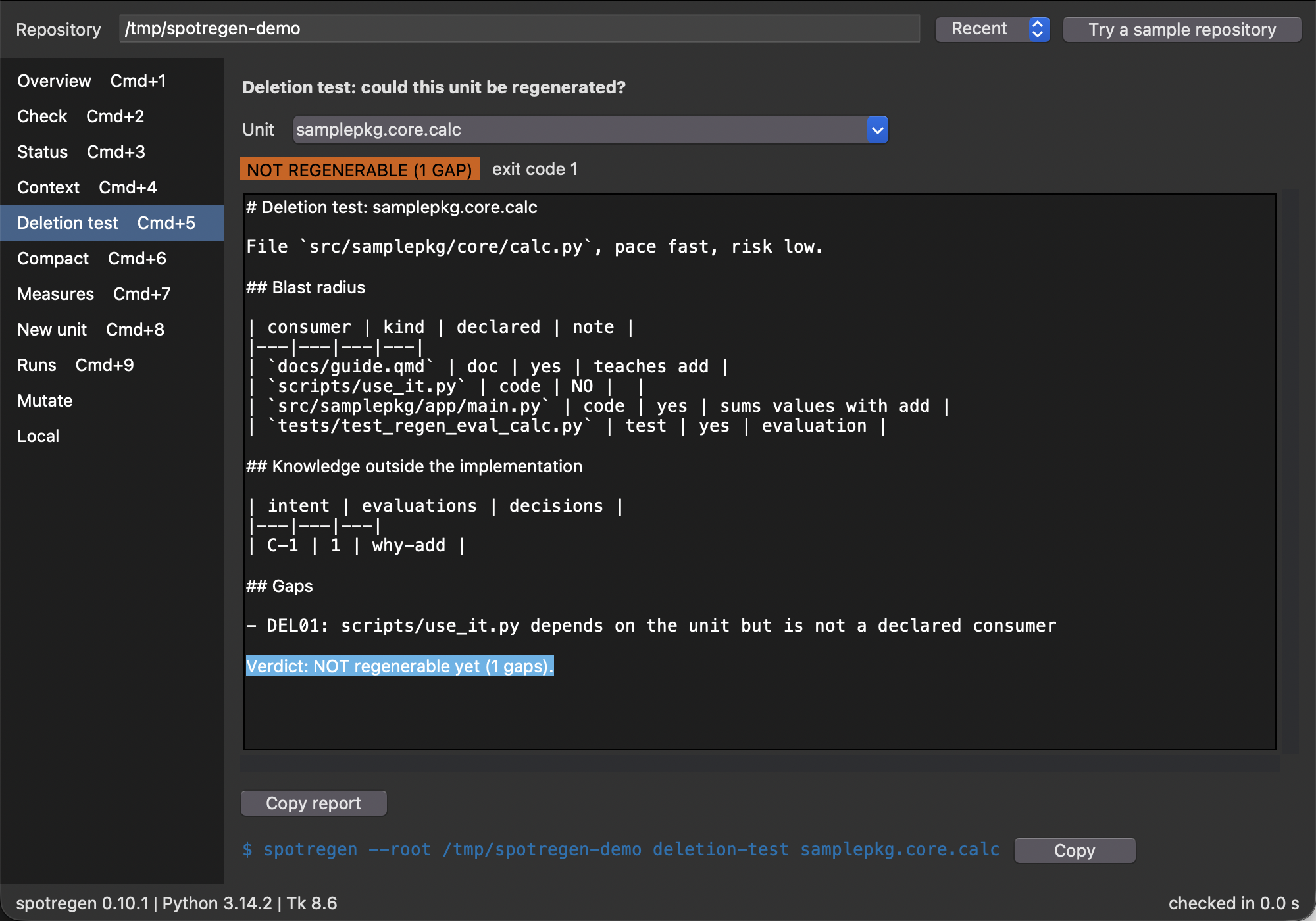
The report of spotregen deletion-test UNIT as Markdown, with a verdict badge above it: REGENERABLE (exit code 0) or NOT REGENERABLE with the number of gaps (exit code 1). The badge reads DeletionResult.regenerable, the gaps are the error findings of the unit check, and the report is DeletionResult.markdown, byte for byte what the command prints.
Compact
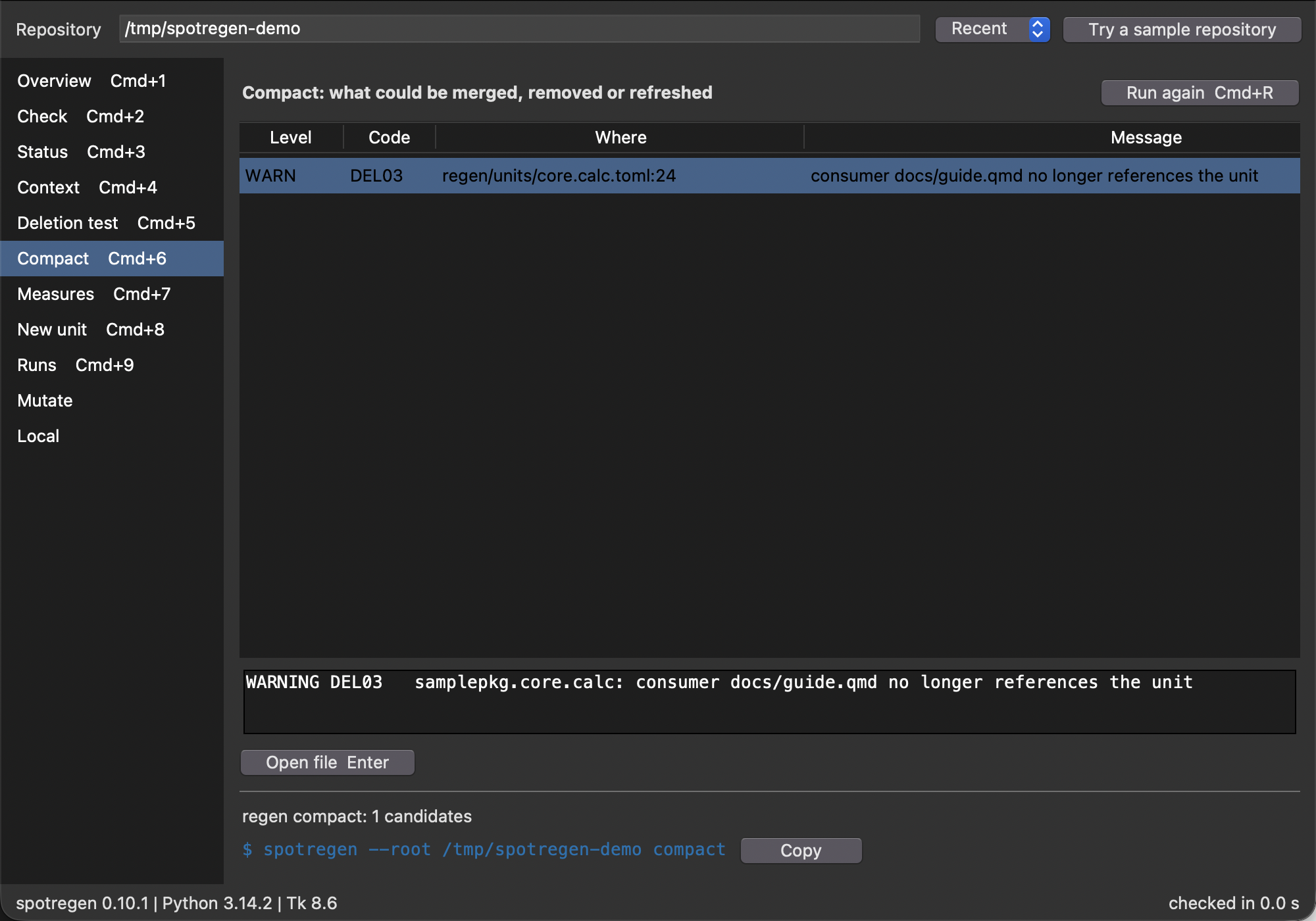
The compaction candidates of spotregen compact in the same finding table as the Check view: Open file shows the file at the line, and the summary line is the one the command prints.
Measures
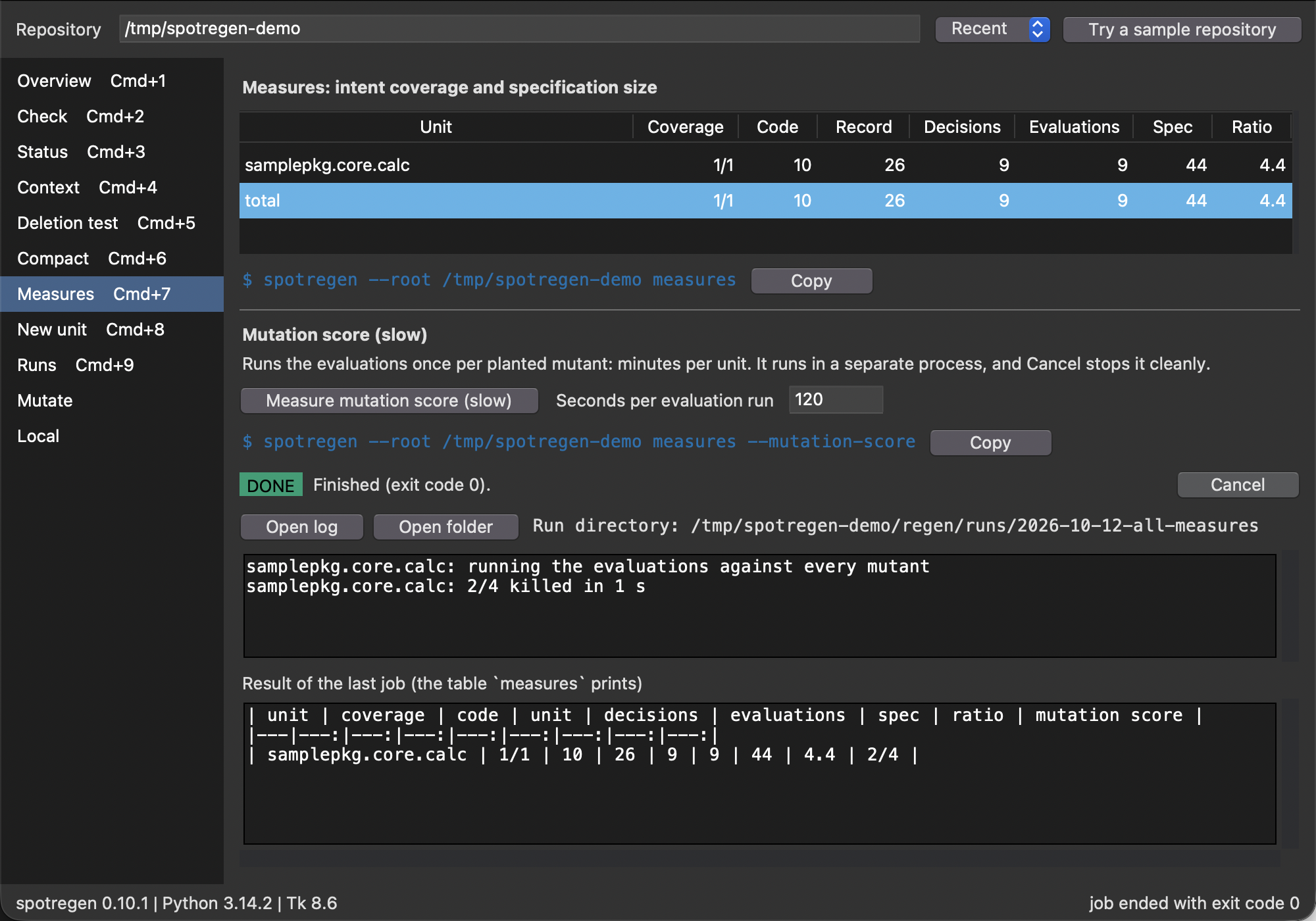
One row per unit, with intent coverage, the lines of code, unit record, decisions and evaluations, the sum of the specification lines and their ratio to the code, and a total row. It reads files only. Measure mutation score (slow) runs measures --mutation-score as a job in a child process (the timeout is the seconds per evaluation run). The log shows the progress lines the command writes to stderr, live; the table it prints on stdout goes to the result pane. Both streams are also written to regen/runs/<date>-all-measures/job.log, a directory that shows up in git status on purpose, because run archives are evidence. When the job ends, the table it printed appears under the log. Cancel (Cmd+.) sends SIGINT to the process group of the job, so temporary copies and worktrees are cleaned up, then SIGTERM after 10 s and SIGKILL after 5 s more. Only one job runs at a time. If you close the window while a job runs, the status bar asks you to press Cmd+Q again, which cancels the job and then quits.
New unit
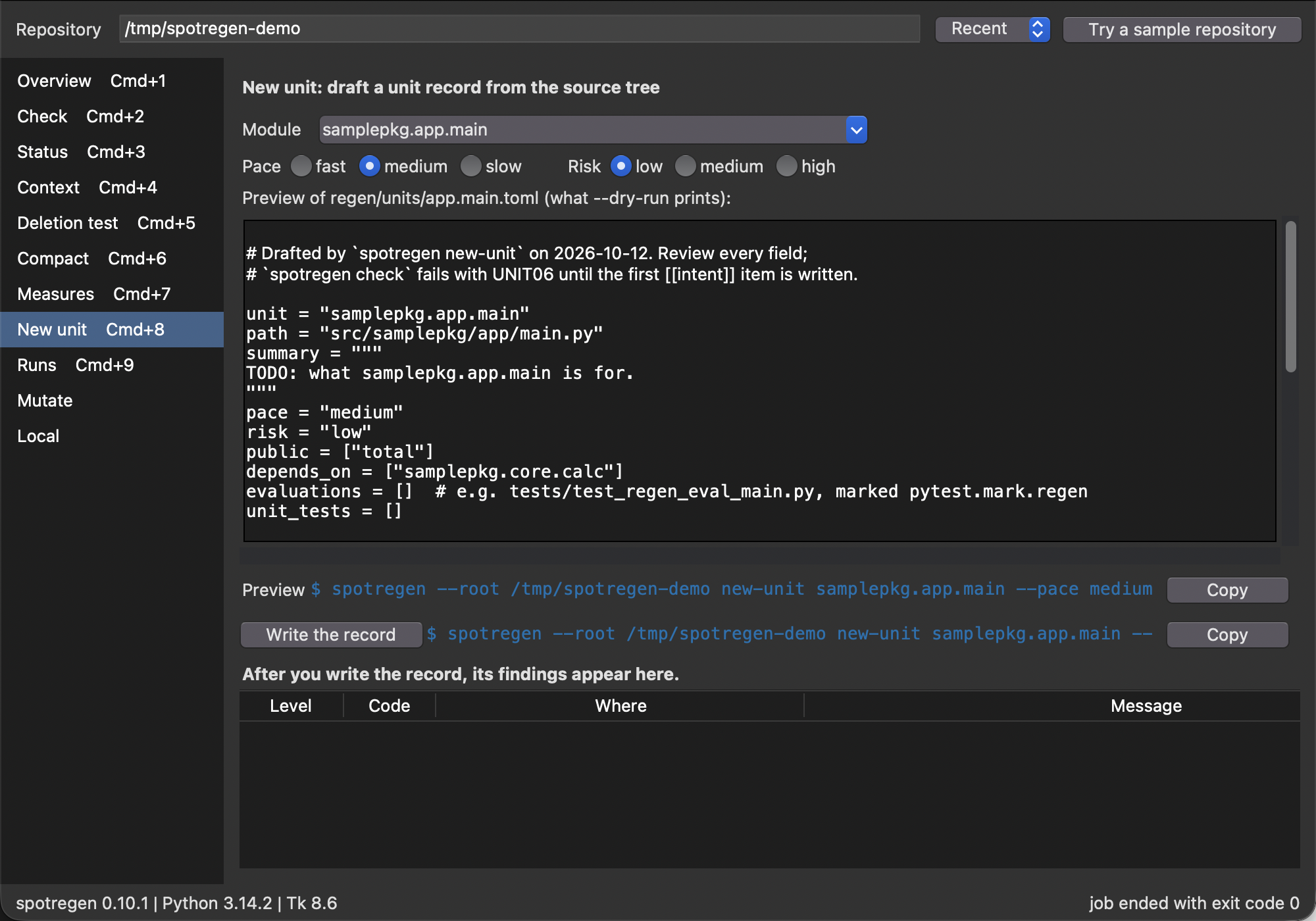
Draft a unit record for a module that has none. The module picker lists the modules below the source directory without a record, or you type a name. Pace and risk are radio buttons with the values of the command line. The preview is the draft --dry-run prints, and it follows every change. Write the record creates regen/units/<unit>.toml, shows the findings of the new record (a fresh draft always has UNIT06 until the first intent item is written) and reloads the repository, so the Status and Check views know the new unit.
Runs
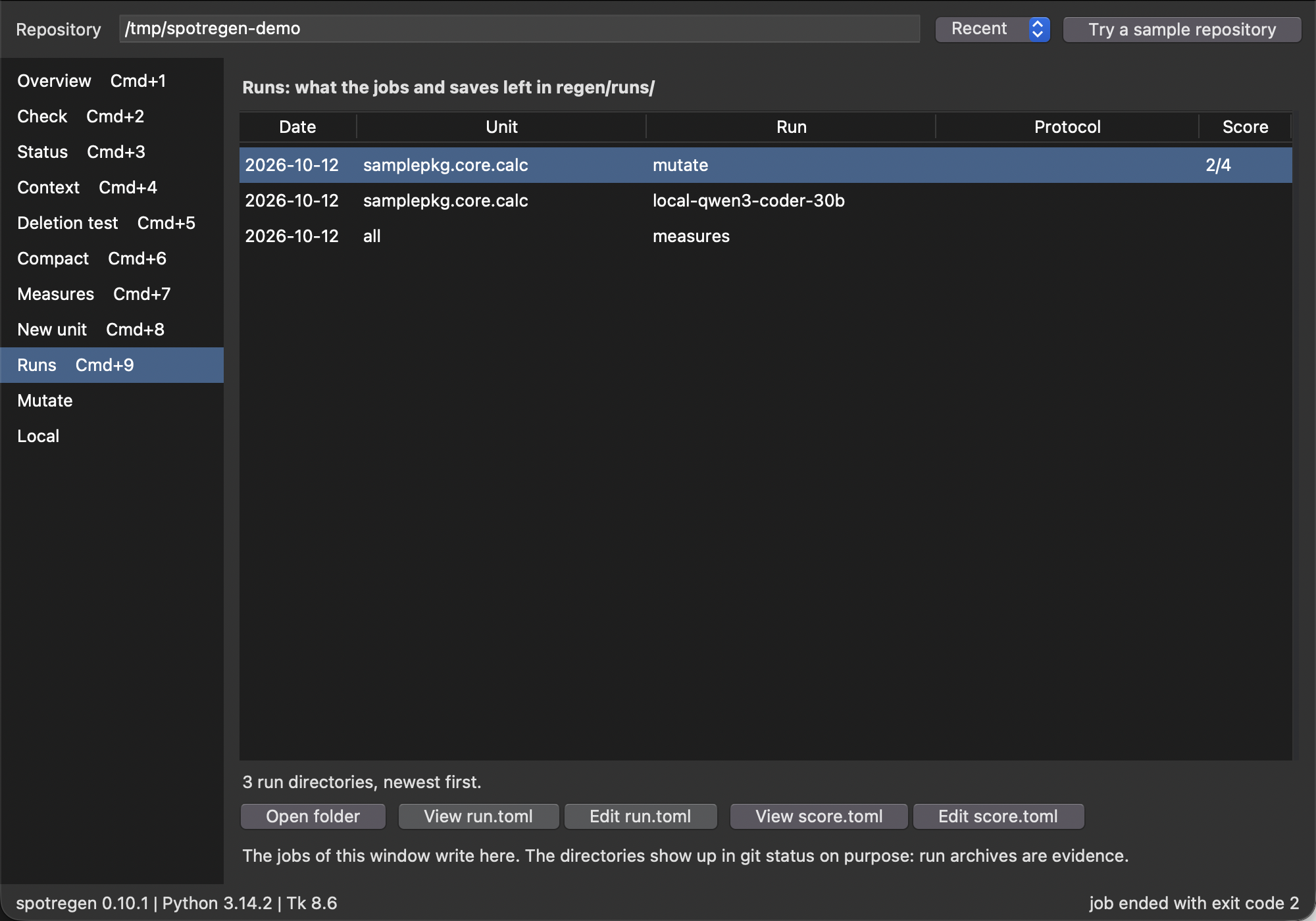
The Runs view lists the directories below regen/runs/, newest first: date, unit, what ran, the protocol from run.toml and the score from score.toml, when the directory has them. The date and the unit come from the directory name <date>-<unit>-<label>. Runs of one day sort by name, and a collision suffix by its number (-10 after -2). “Open folder” shows the directory in Finder (open on macOS, xdg-open elsewhere), “View” shows run.toml or score.toml in the read-only viewer, and “Edit” opens it in the editor like the Check view does. The Runs view has no command line of its own, because it reads a directory and the command line has no command for that.
Mutate
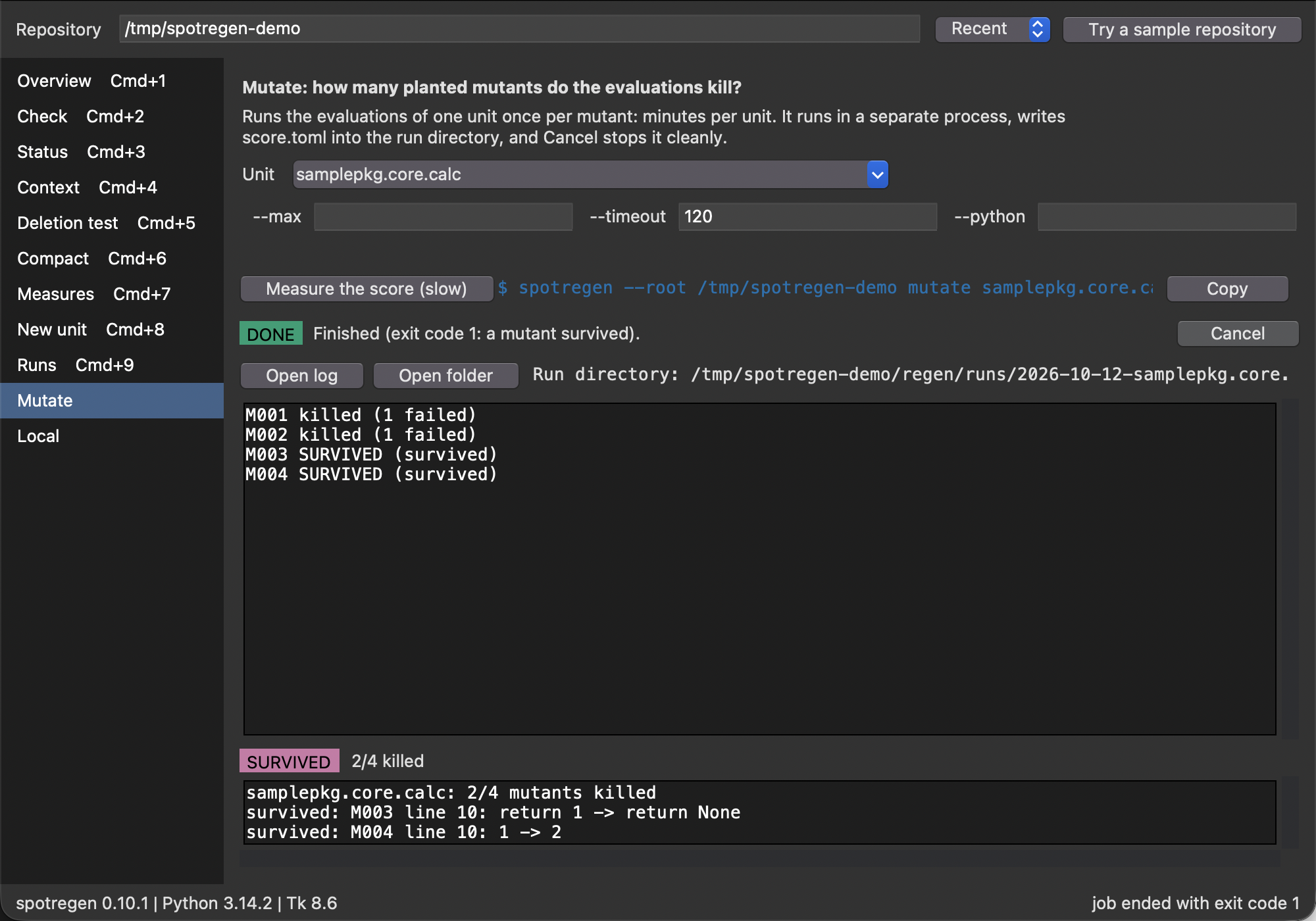
spotregen mutate UNIT runs the evaluations of one unit once per planted mutant. The view runs it as a job in a child process, in regen/runs/<date>-<unit>-mutate/ (an existing name gets -2, -3, and so on), with --out pointing to score.toml in that directory. The run directory is shown from the start, with “Open folder” and “Open log”. The log is the progress the command writes to stderr, live. When the job ends, the view reads score.toml with tomllib and shows the score and one line per surviving mutant. The command exits with 1 when a mutant survived, and the view calls that case finished and says that a mutant survived. Exit code 1 without a score.toml is a failure. A score with no planted mutants shows “no mutants” and not “all killed”. “Cancel” works as in the Measures view.
The options of the form are not written by hand. The view reads them from the parser of the command line (spotregen.parser.command_parser), together with their types, defaults and help texts, and it shows a field for each. The help of the field that has the cursor appears under the form. A value that equals the default is left out of the command, so the command underneath is as short as one you would type. The only options the form hides are unit, which the list sets, and --out, which the view sets to the run directory. A test fails when an option of the parser is neither rendered nor listed as hidden.
Local
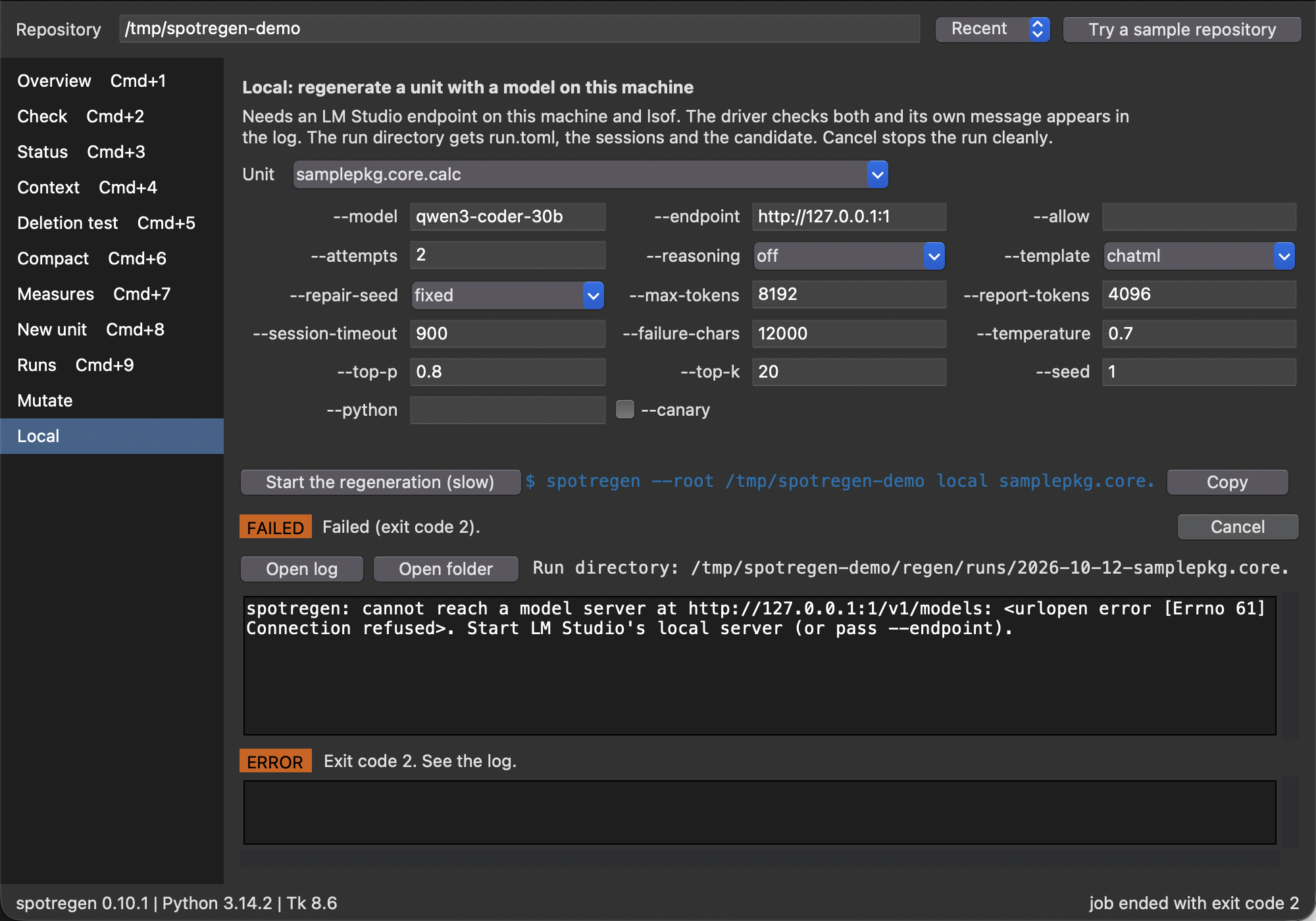
spotregen local UNIT --model M regenerates a unit with a model served on this machine in short sessions (LM Studio, with lsof to prove that nothing leaves the machine). The view works like Mutate, with --out set to the run directory regen/runs/<date>-<unit>-local-<model>/, where slashes and colons of the model name become hyphens. The form is generated from the options of the driver, so it follows the driver. The log shows both streams, because the driver reports on stdout, and it wraps long lines. With --canary the driver runs one session and no candidate, so the view reports the canary and not a passed candidate. When the job ends, the view shows run.toml if the driver wrote one. The view makes no check of its own: if lsof is missing or no server answers, the message of the driver is the first line of the log, as the screenshot shows for an endpoint nobody listens on. The interface never offers the Claude driver. spotregen claude stays a command line command.
Keys
The shortcuts use Cmd on macOS and Ctrl elsewhere. Mutate and Local have no key, because only nine keys are free: pick them in the sidebar.
keys
action
Cmd+1 to Cmd+9
Overview, Check, Status, Context, Deletion test, Compact, Measures, New unit, Runs
Cmd+L
focus the repository field
Cmd+R
reload the repository and run the views again
Cmd+S
save the context bundle
Cmd+.
cancel the running job
Cmd+Q
quit; while a job runs, press it twice
Cmd+F, Esc
focus the filter, clear it
Enter, Cmd+E
open the finding in the viewer, in the editor
Cmd+Shift+C
copy the command shown on the view
Cmd+Plus, Cmd+Minus, Cmd+0
font size larger, smaller, default
The font size is saved. The badges use the Okabe-Ito colours and always print the level word and the code, so colour never carries the meaning alone.
Screenshots
make gui-screenshots captures every view on a sample repository with a few problems, using screencapture (macOS; the terminal needs the Screen Recording permission). The sample has a forbidden import, an undeclared consumer and a stale one. The Measures and Mutate views are captured after a real job. The Local view is captured after a run against an endpoint nobody listens on, so no model server is needed.
Figure 1: The Overview answers the three questions of the first screen and links to the view that fixes each problem.
Figure 2: The Check view lists the findings with file and line. The detail line is the line the CLI prints, and the command underneath reproduces the result.
Figure 3: The Status view groups the units by pace.
Figure 4: The Context view shows the bundle a regeneration would see, with a path field for Save and the command that writes the same file.
Figure 5: The Deletion test view: the verdict badge above the report. The undeclared consumer is the gap.
Figure 6: The Compact view lists the stale consumer as a candidate.
Figure 7: The Measures view with the table, a total row and the finished mutation-score job: its log, its run directory and the table it printed.
Figure 8: The New unit view previews the draft that --dry-run prints; Write creates the record.
Figure 9: The Mutate view after a job: the form from the parser, the run directory, the log, and the score read from score.toml with the surviving mutants.
Figure 10: The Local view: the form generated from the options of the driver, and the message of the driver when no model server answers.
Figure 11: The Runs view lists what the jobs left in regen/runs/, newest first.
What the window calls
Everything the window shows comes from functions you can call yourself; the examples run on the sample repository without a display.
The parity tests run every command the window shows through spotregen.cli.main and check that the window and the command line agree on the exit code, the finding lines, the status rows, the context bundle bytes, the deletion verdict and the new-unit dry-run text. The deletion test and the unit draft come from public functions of the core:
for finding in result.findings:print(finding.format())print(" opens", finding.path, "at line", finding.line)
ERROR   DEL01   samplepkg.core.calc: scripts/use_it.py depends on the unit but is not a declared consumer
  opens regen/units/core.calc.toml at line 1
from spotregen import ( deletion_test, load_spec, scaffold_unit, total_measures, unit_measures, unrecorded_modules,)spec = load_spec(root)outcome = deletion_test(spec, "core.calc")print("regenerable:", outcome.regenerable, "| gaps:", [g.code for g in outcome.gaps])print("unrecorded modules:", unrecorded_modules(spec))print(total_measures(unit_measures(spec, name) for name in spec.units))
The interface stores the recent repositories, the font scale, the editor template and whether check runs on open in settings.json: in ~/Library/Application Support/spotregen on macOS, in %APPDATA%\spotregen on Windows and in $XDG_CONFIG_HOME/spotregen (default ~/.config/spotregen) elsewhere. The key editor is a command line in which {file} and {line} are replaced. Empty means the default of default_template: VS Code when it is installed, Vim otherwise.